My DJing career was at a peak with fully booked weeks and plenty of cash coming in. Feeling like a top-gun DJ, I wanted my gear upgraded to the best-of-the-best. I was on the hunt for CDJs that exemplify the highest fidelity, optimized compatibility, and elite performance.
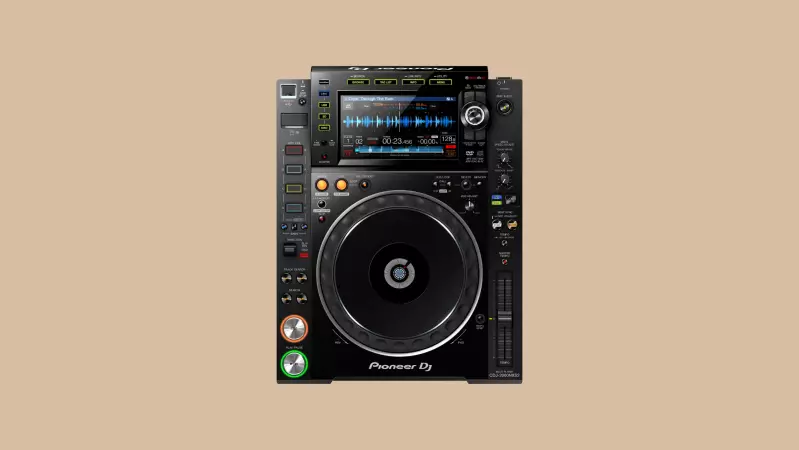
The Pioneer CDJ 2000NXS 2, commonly referred to as the “Nexus 2”, sets the standard in professional-level DJ players. Seasoned DJs that gig in all kinds of venues will come across the Pioneer CDJ 2000NXS 2 quite often. It’s ideal for advanced DJs that need professional sound, who aren’t constrained by budget.
Things to Consider Before Buying a Pioneer CDJ
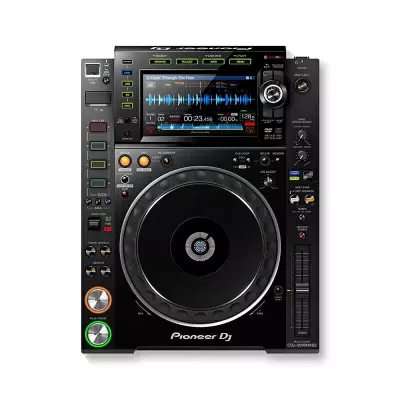
Utilizing a front-facing disc slot, CDJs are a digital music player that historically used compact discs for playing and mixing. Many CDJs primarily play digital files off an SD card, USB flash drive, or a DJ software.
Most CDJ models still have a compact disc slot if there’s a DJ out there using it. I personally still have a few large cases of CDs I could call upon if I want. I built up a great CD collection, so why not use it?
Up until the mid-90s, vinyl ruled as king in the mixing booth. Now you’ll be hard-pressed to find anything but CDJs. CDJs try to encompass the best of both worlds, mimicking turntable features.
CDJs have a similar pitch fader for slowing or speeding up the tempo for beatmatching, although many models offer a beat-syncing mode. Instead of having a large platter, CDJs have smaller jog wheels used for seeking through or nudging the track and scratching.
Scratching doesn’t feel as tactile on a CDJ compared to a vinyl player, but some models integrate mechanisms that perfectly emulate a turntable’s mechanical feel.
CDJs’ features span beyond vinyl players in many ways. CDJs typically have buttons for hot cues, loops, and track selection. High-end models may have performance pads to trigger samples. Most models have built-in screens to display track details, waveform, performance data, and device settings.
The standard set-up for average DJs includes 2 CDJs connected through a 2-channel mixer, but pro-DJs connect 4 CDJ players into a 4-channel mixer for maximum versatility and mixing capability.
Like anything in life – the more you pay, the more you get. The cheap base models have rudimentary jog wheels, simple cue buttons, and a small display. The expensive high-end models include expanded looping & hot cue controls, adjustable jog wheels modes, and larger touchscreen displays.
The Pioneer CDJ 2000NXS 2: A Quick Run-Down
Commonly referred to as the “Nexus 2,” the Pioneer CDJ 2000NXS 2 is the most popular of Pioneer’s CDJ series. If you mix on the Nexus 2, it’ll prepare you for most in-house gear at clubs or events.
The Pioneer CDJ 2000NXS 2 originally spawned from the CDJ-1000 and is now in its second iteration of the design. From our perspective, there isn’t that much difference between the original Nexus and the Nexus 2. So, if you are on the hunt for the same performance but a lower price, find a second-hand original Nexus.
The sound resolution on the Pioneer CDJ 2000NXS 2 is brilliant. The 96kHz/24-bit sound card outputs exceptional fidelity.
The additional FLAC/ALAC file format support is an excellent edition, mainly because of their superlative audio-replication. I wish they made these file format compatibles on all their players. The 32-bit D/A converter adds the final touches to the pristine audio signal.
The build, design, and display controls are all top-notch. The 7-inch touchscreen makes file management easy. The Nexus 2 has flexible connectivity. It efficiently integrates into most DJ software via HID mode, and even interfaces into the DDJ-SP1 DJ Controller for elevated creative tools.
DJs can go completely computer-free with a USB-drive or SD card.
Pros
- Industry-standard professional CDJ
- Flawless build and design
- Large 7-Inch display with easy touchscreen navigation
- Brilliant sound resolution with a 96kHz/24-bit sound card, 32-bit A/D converter
- Supports FLAC/ALAC audio formats
- 4 Cue buttons with two separate banks
- Mix computer free with USB-drive/SD card slot
- Integrates into most DJ software and DDJ-SP1 Midi controller
Cons
- No monumental shifts from the first Nexus model
- A price point that might put a hurting on some DJ’s budget
Features & Benefits of the Pioneer CDJ2000NXS 2
Without a complete breakdown of the DJ controller’s features, DJs wouldn’t know how it might benefit them. Let’s take a closer look at what the Pioneer CDJ 2000NXS 2 has to offer.
The Display & Controls
As the definitive professional CDJ by Pioneer, the Nexus 2 has impeccable components. So, the display is made with premium parts. The Nexus 2 sports a brand new 7-inch touchscreen and browsing controls.
It’s not as good as having all your track details on a computer screen, but the display is handy for mixing. It takes some time to form the muscle memory to operate the controls on the fly.
I typically use the touch screen to navigate through everything, but you can use the button controls if that’s your style. There are a few features that only use touch controls. Using the touch screen is necessary for jumping around the track by pressing directly on the waveform. There’s a touch screen Qwerty keyboard for instant searching if you already know the track you want.
By far, the most useful browsing feature is the Track Filter menu. You can sort your music library by BPM or key and tag tracks with ratings or color-coding.
When I’m DJing a set, I’ll sort by BPM to find a rhythm that’s at about the same tempo as the track I’m playing. The Track Filter menu saves me a ton of time.
The phase meter display is an excellent feature that shows the beat grid. It’ll help align beat matching and cue loops synced with the beat. The waveform can be switched from blue to multi-frequency colour waveforms to distinguish bass hits and high hats.
The “Quantize” button located on the display dash should always be engaged, to make sure your loops sync perfectly with the beat. The shortcut button comes in handy to give me direct access to settings or browsing mode.
Looping section
The Nexus 2’s looping section is almost the same as all the other top-end Pioneer CDJ models, except for the 8-beat auto-loop feature. Press and release the loop-in button to begin an automatic 4-beat loop. Press and hold the loop-in button to start an 8-beat loop.
You can always assign loops via the touchscreen, but I prefer the feel of the looping buttons during performances.
Hot Cues
The most noticeable addition from the original Nexus to the Nexus 2 is the change from 3 cue buttons to 4 cue buttons with two selectable banks.
I’m always using the hot cues during my performances. The extra hot cue options are a huge bonus. You can set 8-cue points beforehand in Rekordbox, which will transition seamlessly to the CDJ controls.
Configuration with the DDJ-SP1
To unlock more performance features, the Nexus 2 can link directly into the DDJ-SP1 add-on DJ controller. You combine the CDJ’s vinyl functions with the unlimited creative possibilities that controllers introduce.
The DDJ-SP1 has a simple layout with mirrored controls for each deck. You can use the performance pads to trigger the hot cues, loops, and loop rolls from the Nexus 2. The performance pads can also be used with a sampler to trigger drums or other sounds.
Used with the Serrato DJ software, you can access 30 FX powered by iZotope. Indeed, using the Nexus 2 with the DDJ-SP1 unlocks radical creative tools you might use for mixing.
Connectivity
You can completely do without a computer if you mix with a pair of Nexus 2s. Get yourself a USB thumbstick, drive, or SD card packed to the brim with music files. For me, it’s nice to go without a computer if I’m in a rush or need to keep my set-up tight.
Typically, though, I enjoy mixing with a laptop’s larger screen and a DJ software’s extra performance option. The Nexus 2’s HID mode enables access and control of many DJ software. The HID Mode is far superior to the default timecode control mode.
Unlike timecode control, HID mode allows the CDJ’s buttons and features to control the DJ software. Nexus 2’s connectivity is a huge benefit compared to others.
It’s a given that the Nexus 2 can work with Rekordbox, but it can also connect to Traktor Pro 3, Serato DJ Pro, and djay PRO. Those are all the heavy hitters and the most common software on the market.To further enhance the quality of your performance, pair the Nexus 2 with the ShowKontrol system to synchronize visuals into your show.
Alternatives to the Pioneer CDJ 2000NXS2
If the Pioneer CDJ 2000NXS 2 perks your interest but doesn’t exactly have what you want in a CDJ, check out these other similar options with a little bit of a different spin.
1. Pioneer CDJ-900NXS
For many DJs, it’s a difficult decision between the Pioneer CDJ 2000NXS 2 and the Pioneer CDJ-900NXS. For those strapped for cash, the CDJ-900NXS comes at a lower price with many of the same features. The CDJ-900NXS has a similar LCD screen with Wave Display and Zoom. The display includes intuitive browsing options and mixing tools like Beat Countdown and Phase Meter.
Both CDJ models have a dedicated quantize button to time the loop perfectly with the beat, and four-deck beat Sync to automatically synchronize the BPM of independent tracks with the master track.
There are a few options that set the two apart. The Beat Divide section slices each beat to pre-set time lengths. Each loop length has its independent button to simplify loop operation and improve loop rolling. DJs can mix sets from their smartphones with the CDJ-900NXS and Rekordbox software.
- Similar features as the Nexus 2 for a lower price
- LCD screen with Wave Display/Zoom, Beat Countdown, and Phase Meter
- Dedicated Quantize button and four-deck beat sync
- Beat divide section to slice & dice loops for added creativity
- Mix sets off a smartphone with the Rekordbox software
2. Denon SC5000 Prime
From features, specs, and price, the SC5000 Prime measurably beats out the Nexus 2. Denon unveiled the model to overtake the CDJ 2000 Nexus 2’s throne as the reigning club CDJ. With enough time and the right DJs publicly mixing on the CDJ, the SC5000 Prime might win-out.
For about half the cost of the Nexus 2, you get more features in the SC5000. The cost vs. features ratio makes it a no brainer. Compared to the Nexus 2’s 4 hot cue pads, the Prime is a ‘next-gen’ model with 8 performance pads with 4 pad modes – Hot Cue, Loop, Roll, Slicer.
The Prime’s build, although maybe not it’s ascetics, is far superior as well. The Prime has a built-in CPU that rapidly analyzes your entire library. It has 3 USB slots, with RCA, Ethernet, and Digital output connectivity. The Prime has a sharper resolution screen operating at 50fps refresh rate.
- More Features, better specs, and cheaper than the Nexus 2
- 8 Performance pads with 4 pad modes
- Built-in CPU to rapidly analyze huge music libraries
- Sharp resolution screen – 50fps refresh rate
3. Denon SC3900
For a vinyl DJ that can’t get used to the feel of jog wheels, the Denon SC3900 is the best alternative to a turntable – in a CDJ. With a 9” platter, simulated vinyl disc, high torque direct drive motor, touch sensitivity, and tension control, the SC3900 might convince vinyl DJs it’s the real deal.
Being a CDJ with incredible turntable options, the SC3900 blends the perfect mesh of analog and digital features. DJs can scratch using any digital files with full confidence and freedom. There’s no needle to worry about skipping or scuffing the disc.
Like the Nexus 2, the SC3900 supports DJ software and comes native with Rekordbox (available as an app for the iPad). The CDJ also connects USB storage drives with the built-in “Engine” file management software. It has standard performance features like looping and 4 hot cue pads.
- A CDJ with the most realistic vinyl replication on the market
- 9-inch platter with a vinyl disk for a realistic feel
- Connects natively to Rekordbox DJ software or USB storage drives
- Looping section & 4 hot cue pads
Final Thoughts on The Pioneer CDJ 2000NXS 2
The Pioneer CDJ 2000NXS 2 is the industry leader in professional club equipment. It’s got all the makings of the top CDJ on the market with flawless build and design.
The soundcard outputs high-fidelity audio, with a 96kHz sample rate, 24-bit depth, and 32-bit A/D conversion. The Nexus 2’s 7-inch LCD, touch controls, and track selection options put the mixing process solely at the CDJ if you want to forego your computer. The move up to 4 hot cue buttons with 2 different banks was a smart addition that DJs utilized for mashing up the mix.
The Pioneer CDJ 2000NXS 2 is ready for DJs ready to step into the professional audio world and have the cash-flow to do it.