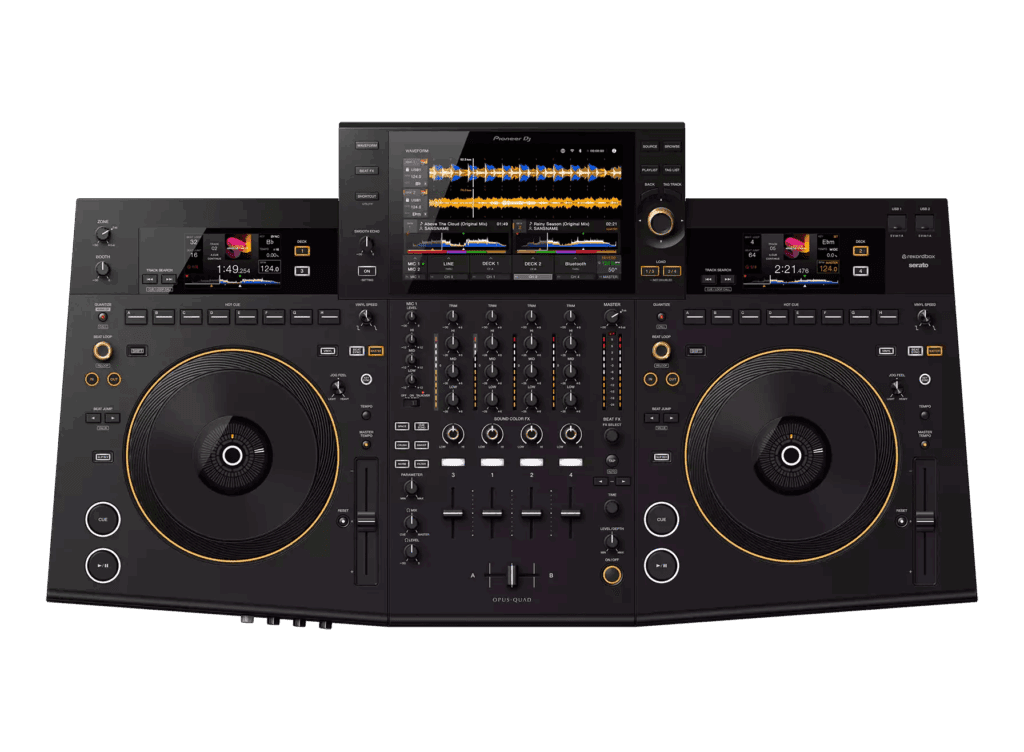
While there are a lot of brands out there that have developed a reputation for putting out some great DJ gear, there is a reason why Pioneer DJ kind of is in a league of its own. They’ve proven themselves time and time again, however, the recently released Opus Quad all-in-one standalone DJ system makes it clear who’s the top dog in an increasingly diverse DJ scene.
Meant as the counter to Denon DJ’s Prime 4, the Pioneer DJ Opus Quad is a four-channel standalone system that offers power on top of style, complete with online music streaming services, an on-board track analysis, as well as several wholly new DJ innovations entirely unique to it and it alone. It’s been clear since the Prime 4 came out that people were waiting on Pioneer DJ’s response, and while I expect this will turn a lot of heads, it’s going to be especially well-liked by mobile DJs as well as DJs that find themselves doing a lot of events and parties.
The only real contention point may be the price of this Pioneer DJ Opus standalone DJ gear. It’s certainly not a cheap piece of equipment by any means. That said, I expect that when most people see everything this system has to offer, they’re going to realize that, more often than not, this will easily be money well spent.
Is the Pioneer DJ Opus Quad Any Good?
The Pioneer DJ OPUS QUAD is a professional DJ controller that is designed to offer a high level of performance and functionality for DJs. It features four decks, which allows DJs to mix and blend multiple tracks simultaneously. The controller also has a large number of performance features, including touch strip controls, backlit performance pads, and a built-in sound card.
Overall, the Pioneer DJ OPUS QUAD is a highly capable DJ controller that provides a spectacular DJ experience. It is designed for professional DJs who demand the highest level of performance and functionality. It has received positive reviews from many DJs and critics, although the final judgment on its suitability will depend on the individual needs and preferences of each DJ.
Pros:
- Super Innovative Standalone Controller
- Three Main Screens & Jogwheel Display Screens
- High-Quality Output Sound
- Multiple Streaming Options
Cons:
- Expensive
- Might Not Be For Everyone
First Impressions
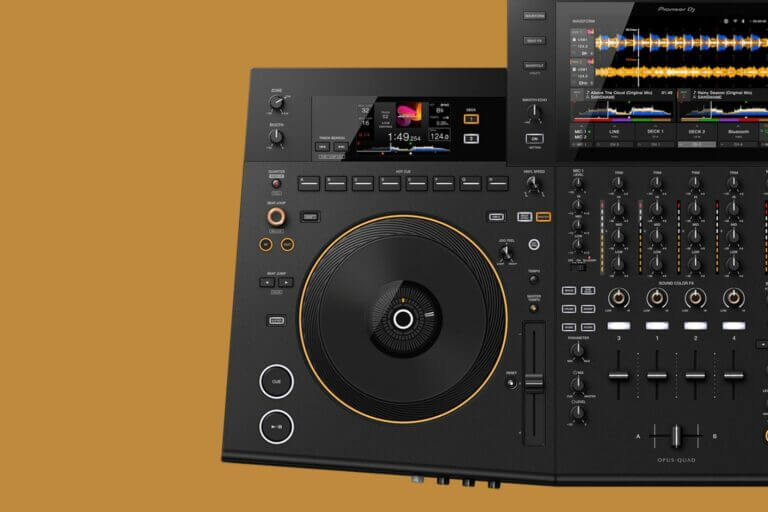
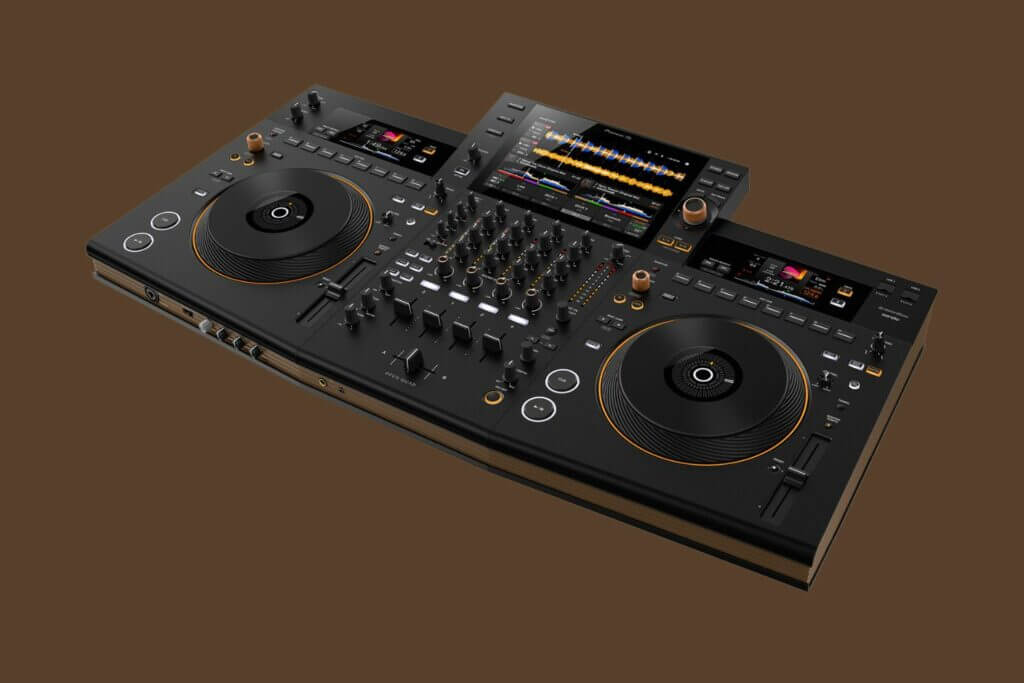
The first thing you’re going to notice with the Pioneer DJ Opus Quad is just how different it looks compared to the majority of the Pioneer DJ controller range. On one hand, you may be attempted to assume this is just a really big controller, but then you’ll notice all of the different style choices and that sentiment will pretty much fly out the window.
Dimension-wise, the Pioneer DJ Opus Quad has a length of 36.4 inches, a width of 5.6 inches, and a height of 19.7 inches. The Opus Quad weighs 29 pounds and comes with a 10.1-inch fixed touchscreen display.
DESIGN
As mentioned before, the biggest note with the Opus Quad is its utter departure from Pioneer DJ’s standard look. Yes, it’s clear they’re the ones that made it, but if you’re looking for something wholly familiar, this may throw you a bit for a loop.
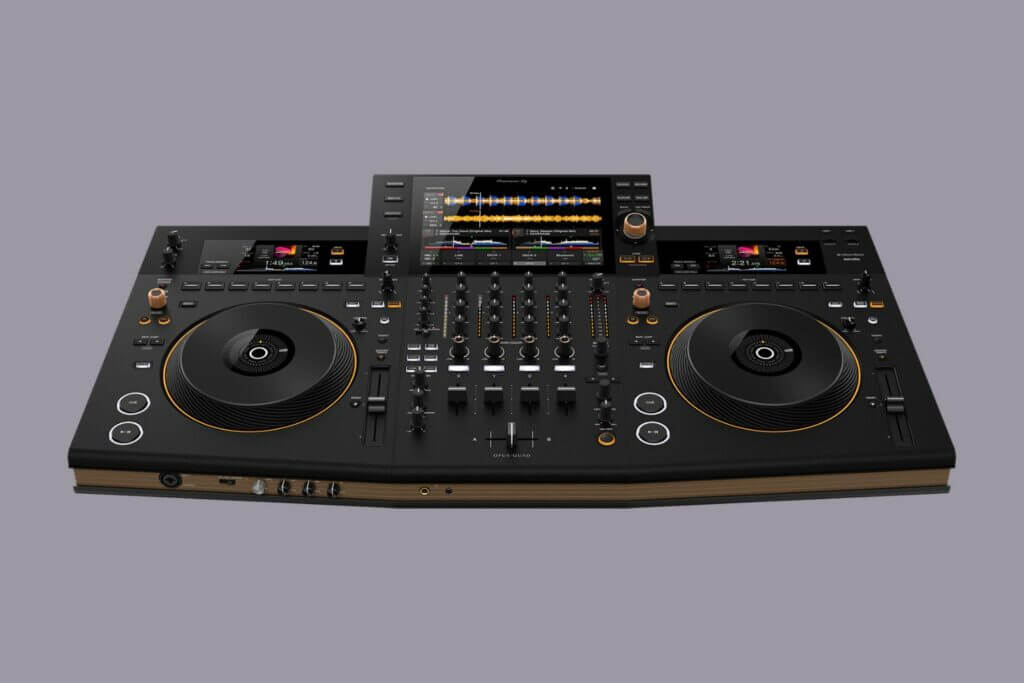
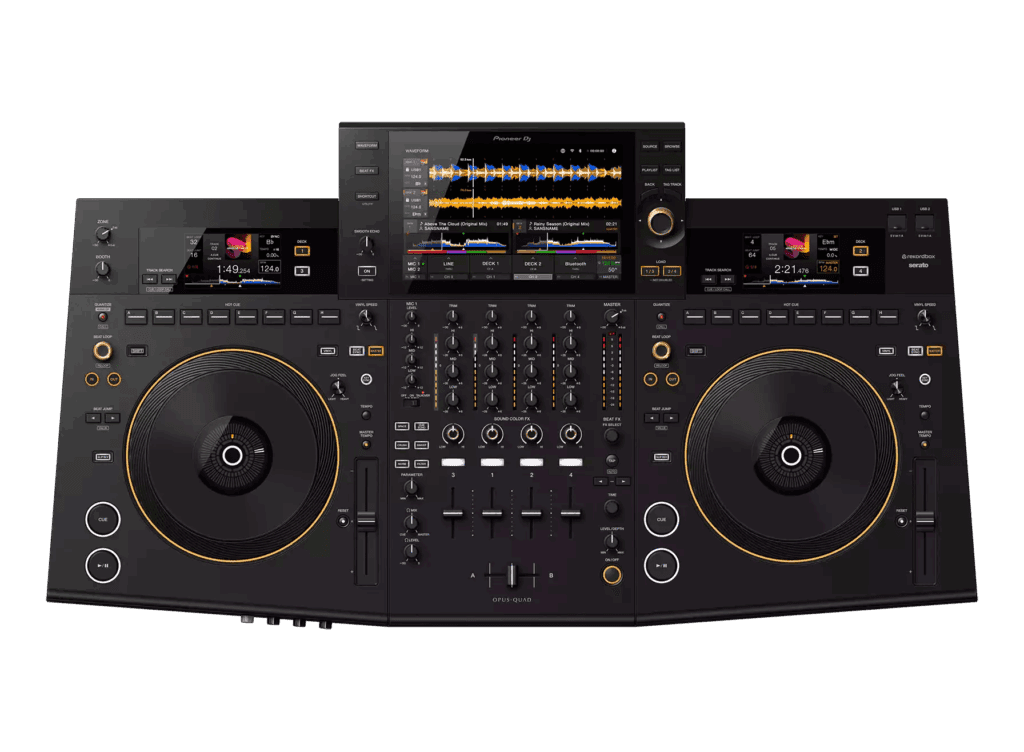
The Pioneer DJ Opus Quad has a lot of different curves and angles to it while sporting a wood-looking brown edge. The DJ system’s knobs also have something of a brass-effect edging to them that gives them a higher quality look, if even only just from a visual perspective.
There are a lot of oranges and dark greys floating around here which give the entire system this rustic “furniture-esque” quality to it. I can’t say I’m a mega fan of its visual style, but I suspect that’s more because I’m a lover of the all-black or red/blue and black color schemes that tend to fit the club aesthetic. On its own, it certainly isn’t bad. I’m just curious how many people are big fans of the brown and brass look.
BUILD
From a build-based perspective, the Pioneer DJ Opus Quad, while certainly holding onto a few pounds, makes a point of appearing as sleek and slim as possible. Using a “wedge” shape design, the Opus Quad is able to pull a MacBook Pro and comes across as a lot skinnier and less bulky than it is.
Much of it is plastic, but it’s clear that they didn’t skimp out on the quality. It feels like something that could take a smack or two without flinching, and while I wouldn’t recommend dropping it (for obvious reasons) it is at least a little durable in that respect.
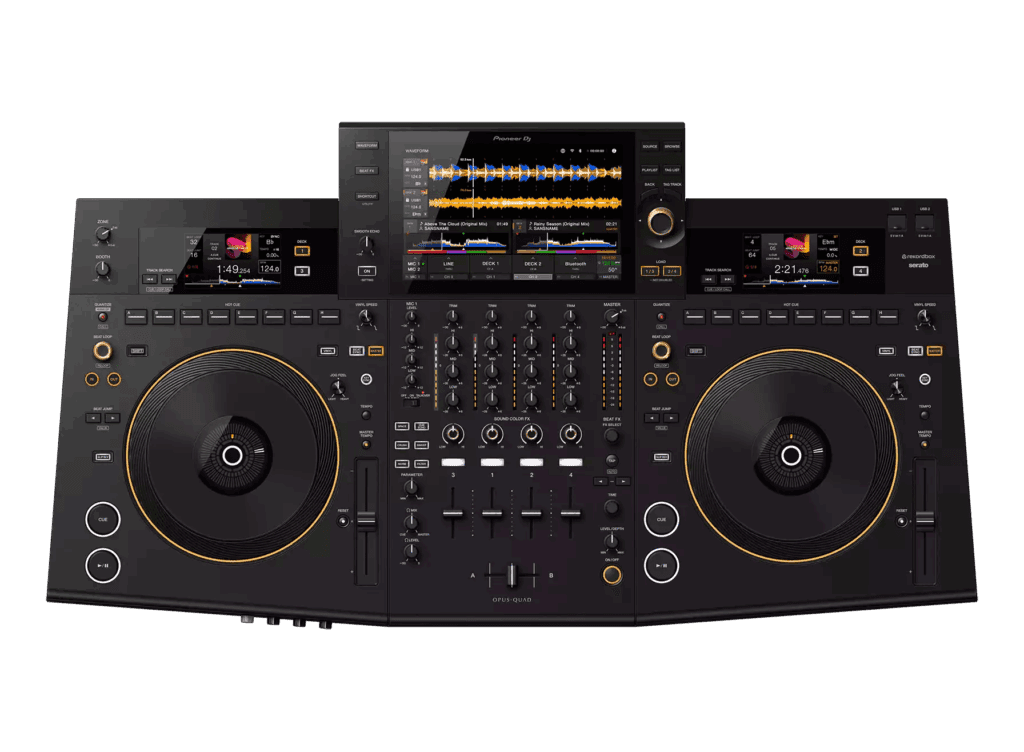
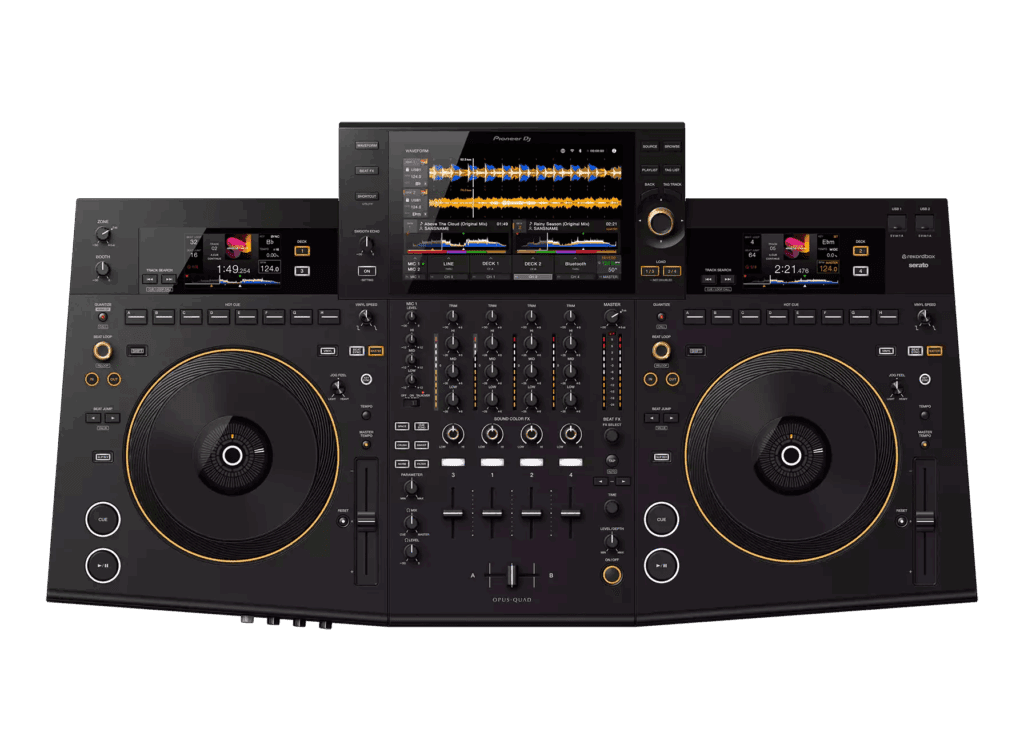
In addition to the 10-inch touchscreen, the system has two auxiliary screens that sit above either jog wheel. If you’ve ever seen the Pioneer DJ’s CDJ-3000 line, you’ll definitely recognize the similarities between their jogwheels and these. Sure there’s a re-up on the style, but between it and their hot cues, it’s clear there was more than a bit of inspiration being pulled from.
A DEEPER LOOK
INPUT/OUTPUT PORTS
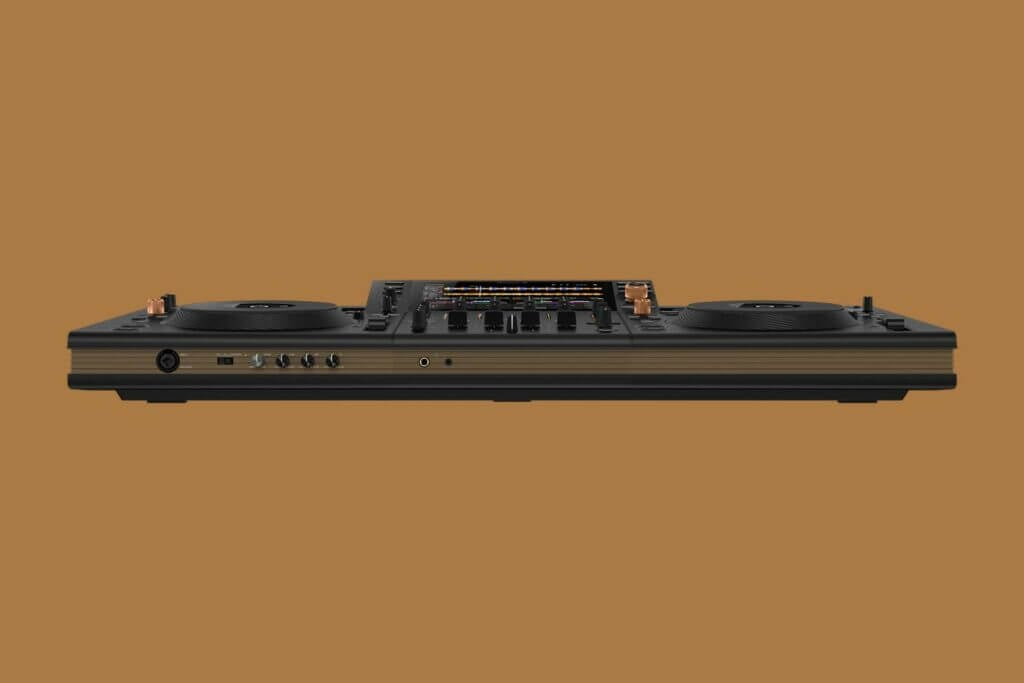
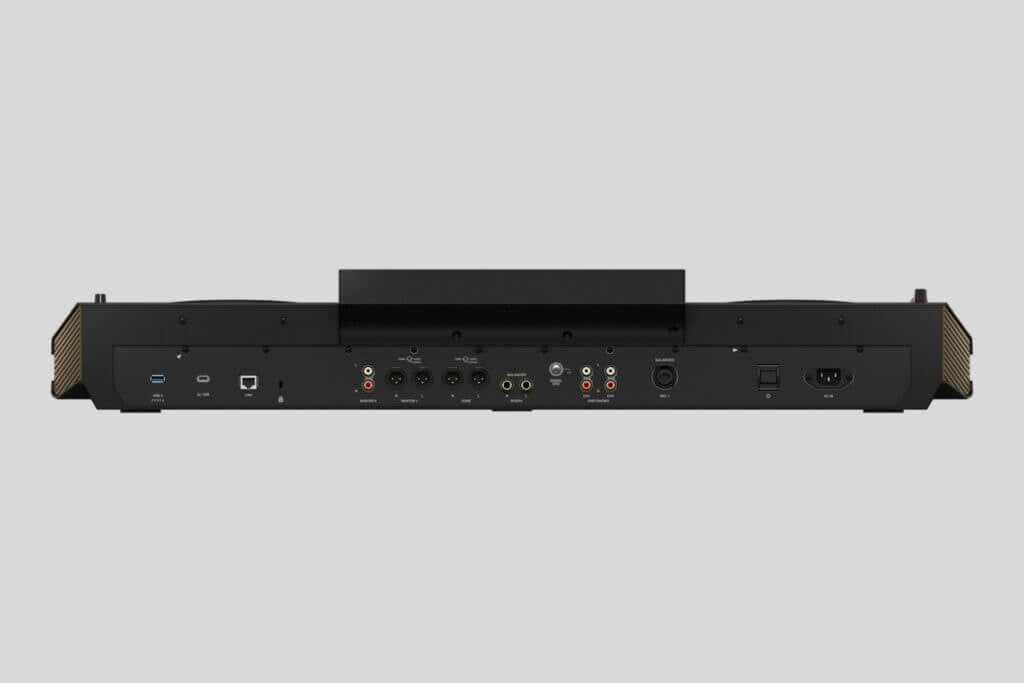
Starting with the various input and output ports, if you were curious whether the Pioneer DJ Opus Quad could provide them, I’ve got some good news for you. It’s clear that this was meant with mobile and event DJs in mind first and foremost as it’s come littered with a ton of ports to play with.
Firstly, there’s a pair of mic channels that both come with their ability to cancel feedback as well as have their own three-band EQ and comprehensive routing. Additionally, there are a pair of line/phono input options which are used for the third and fourth channels, master output ports for the XLR and RCA cables, a TRS booth out, and finally a Zone output port which is used to play music through channels 3 and 4 that is entirely separate from what’s going on in the main two channels.
This provides not only a chance to appease two separate rooms simultaneously but can help create some dynamic mixes if all four channels are being played in the same location.
I’d normally include any Bluetooth options as their own section, but here it’s clear that the Bluetooth was meant to act as an input option specifically, making it especially useful while also offering a quick and easy backup through your phone.
The Opus Quad also comes with several different USB ports. These work for music inputs as well as for connecting to the computer, making it a great stand-in alternative for those who miss performing with a DJ controller.
The music USB ports consist of three USB-A options with one of those being a USB-3, making it particularly great for SSD users. The computer USB port is set aside for USB-C types.
This is also great for working with Rekordbox Link’s wired option if you’re not able to use the wireless WiFi option.
Pros:
- Super Innovative Standalone Controller
- Three Main Screens & Jogwheel Display Screens
- High-Quality Output Sound
- Multiple Streaming Options
Cons:
- Expensive
- Might Not Be For Everyone
Display Screens
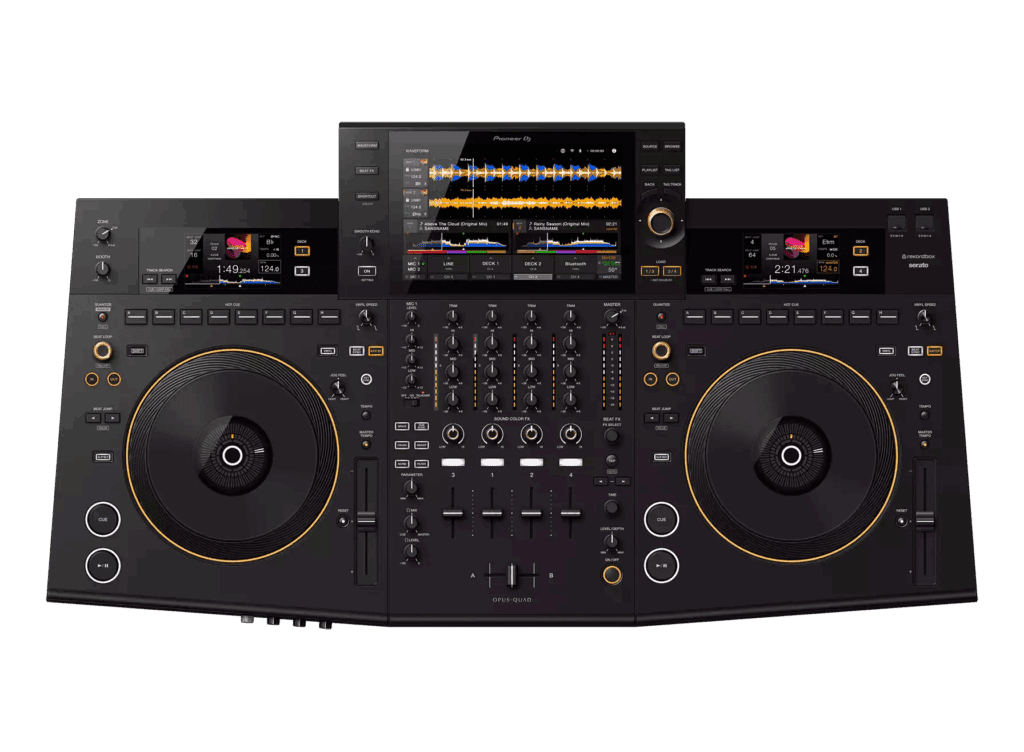
While I like to talk about the different ports that are coming with this thing, the elephant in the room is definitely going to be these crazy display screens propped up. As mentioned, the main screen is 10.1 inches and is a touchscreen with a glass face rather than the more prominent plastic ones.
This means you’re stepping into iPad territory, which is a long time coming. As much as I love Pioneer DJ, their screens have always been “ok” or average at best. These glass-top screens instantly add a level of refinement to the system that wasn’t necessarily there with other devices.
In addition to looking and feeling great to touch, the screens are also very responsive with high resolution, making them great to play around with even if it’s just scrolling through and seeing your different songs.
This definitely makes the Opus Quad stand alone when ranked next to most of the other standalone Pioneer DJ devices and is certainly a match for the Prime 4.
Here are just a few of the different functions you can use with the main screen and its different control options:
INPUT MATRIX: This function allows you to select input options for Deck 3 and Deck 4. This includes the line/phono input as well as the internal input and the Bluetooth input.
KEY SHIFTING: Allows users to key shift directly from the screen. This is separate from the key sync option which is located on the console itself.
CROSSFADER ASSIGN: This crossfader function lets you assign which of the two smaller screens with any of the four channels.
FADER CONTROLS: The fader controls consist of the crossfader curve as well as the fader curve.
OUTPUT ASSIGN: The output assign function allows users to assign different output options, ranging from things like the booth, and attenuation, as well as the different zones or the mic routing.
UNIT APPEARANCE: This controls the deck colors as well as the various waveform display options.
Of course, what sells this ticket isn’t necessarily the one impressive touchscreen, but the two additional auxiliary screens.
Both of these screens are stationed above their respective jogwheels and, while not at the same level of high-res high-quality that the main screen is, they aren’t by any means “bad”. In truth, they’re just more in line with most of Pioneer DJ’s screen options.
The second screens are where you’re going to get into things like elapsed and remaining time, BPM, album artwork, loop and key information, and all of the immediate “in the know” types of things. Essentially, they’ve just taken the in-jog displays and given them their own separate screen, which is kind of cool when you think about it.
In addition to these screens, the in-jog displays still exist, instead focusing on transport info only rather than cluttering them up with all of the aforementioned things. This gives the jogwheels a bit of a minimalist vibe that is less claustrophobic for people that might want to only grab one or two bits of information.
Sound Quality
In addition to the impressive monitors and input/output options, the Opus Quad has some understandably amazing sound quality. Pioneer DJs themselves have said that the Opus Quad sports the ESS 32-bit audio chip, found only in the DJM-V10 and A9 mixers. This is a considerable improvement and beats out just about every one of their other standalone console devices.
What does this mean for sound quality? Well, it means you can expect sounds to be especially crisp and full-bodied while also having an additional sense of clarity to them. #
You’re still going to want to invest in a good pair of speakers to maximize these benefits, but you’re definitely going to tell a difference when comparing the Opus with virtually any other standalone option on the market.
DJ CPU Tech
Of course, it shouldn’t be a surprise that not only is the Opus Quad using impressive CPU tech in and of itself, but is using arguably some of the most advanced and “next-gen” CPU processing of any DJ unit on the market.
We’ll get to some of the specifics in a bit, but for now, it’s worth mentioning that this is why it can do many of its various additional features. An easy comparison is with the previously mentioned Denon DJ Prime 4, which was known for having a very impressive CPU engine.
And while Pioneer DJ has always lagged a bit between the two, the Opus Quad is said to surpass the Prime 4, Pioneer DJ heralding it as THE most powerful standalone DJ console as a result. Whether or not this is strictly true, the fact of the matter is that this machine can do much more than virtually any other Pioneer DJ device before it.
DJ Software and Streaming
One of the things that are slated to come soon (if not already there depending on when you’re reading this) is streaming services. While not included during its initial launch, Pioneer DJ has already stated that the Opus Quad will have all of the major streaming services coming to it.
This includes some of the big names like TIDAL, Soundcloud, Beatport, as well as Beatsource. In essence, this will provide the user with access to a huge online streaming music library.
In the meantime, if you don’t want to wait, it’s easy enough to just use the already included Rekordbox DJ software which has many of these streaming services already built into the system.
What about Serato DJ Pro I hear you cry. Well, there’s even slated to be a Serato DJ Pro option that comes out later this year, which is going to make this system even more compelling simply from a DJ software perspective. So all good there with Serato DJ Pro and the Opus Quad.
BEAT FX
The Beat FX, on the surface, is fairly straightforward with all of the things you can expect from a DJ console. It’s only when you start to dig into the Beat FX parameters that some of the revisions and innovations start to make themselves apparent.
For starters, the Sound Color FX has been given a once-over. There’s also been the inclusion of an infinity encoder to select from. The encoder is pretty stiff and I suspect that that was intentional.
It brings up a menu of the different available effects to choose from and can be accessed by tapping on the Beat FX button found on the left-hand side of the main screen. This opens up one of the newer features that help to speak to the improvements made.
The X/Y on-screen control window lets you play with the effects with only your finger. You can affect the main parameters by moving them from left to right while moving them up and down helps add the different features. These include things like reverb and echo, as well as any additional filters.
Additional Features
It’s clear that the Opus Quad has made a point of showing that it’s come with a lot of fun and useful additions that are meant to set it apart from not only other Pioneer DJ consoles but from other standalone consoles as well. two of the biggest new additions include the revisions done to the smooth echo as well as the hot cue function.
Smooth Echo
The Smooth Echo feature essentially acts as an automatic version of the “Echo Out”, which has become a pretty popular effect with most mobile DJs performing in different settings.
The smooth echo feature has its own knob alongside an on/off button at the main screen’s lefthand side. The feature is pretty cool and only makes its presence known once you’ve stopped a track or are in the middle of crossfading away.
At that point, it kicks in and sets up a beat echo on the outgoing track and offering you a smooth finish to either end things entirely or jump directly into something else. It can be set to trigger whenever you want, whether that’s as you’re cutting or when you’ve wrapped up a track and are ready to move on entirely.
Hot Cue
The second feature on the Opus Quad is the new and improved Hot Cue button. Now, whenever you press a hot cue, the Opus Quad creates a temporary cue point that is moved to that hot cue. This is entirely optional and can be used or not used based on what you want. This means that you can more or less control the track using the hot/temporary cue button. It’s located right next to the play/pause button so it’s pretty easy to find and use whenever you want to set it up. It even changes color to match the selected hot cue color so you know that they’re synced up.
The temporary cue feature will only play when it is being held, a stark contrast to the hot cue feature which will play when touched even if the track itself is paused. As a result, DJs have greater control over their chosen cue point which means better overall performance.
Overall Performance
What We Like:
- Super Innovative Standalone Controller
- Three Main Screens & Jogwheel Display Screens
- High-Quality Output Sound
- Multiple Streaming Options
What We Do Not Like:
- Expensive
- Might Not Be For Everyone
Pros:
- Super Innovative Standalone Controller
- Three Main Screens & Jogwheel Display Screens
- High-Quality Output Sound
- Multiple Streaming Options
Cons:
- Expensive
- Might Not Be For Everyone
Pioneer DJ Opus Quad: The Verdict
Pioneer DJ came to play in 2023 and the Opus Quad is the surest sign of that. I’ve always been a fan of Denon’s Prime 4 and even gave it its own glowing review. What the Opus Quad has done is difficult to articulate as the simple fact is that they’ve pretty much just done everything. It provides everything that an artist required to mix tracks smoothly and deliver versatile DJ performances.
Ultimately the biggest hang-up for some is going to be the price, and I think that’s a conversation worth having. Normally, I’d suggest only getting this if you’ve got the funds and looking for something a bit more reasonable if you didn’t.
While I’d still say that if you were a starting DJ or someone that just wasn’t in the financial space to make that type of DJ gear investment, for everyone else (especially mobile DJs) I really think this is something you don’t want to miss out on.
Yes, you can get along well enough with a lot of other standalone consoles out there, but that’s like saying you can get along well enough taking the bus rather than a Porsche 911 Turbo. Yes, it’s possible, but you’re going to miss out on a LOT as a result.