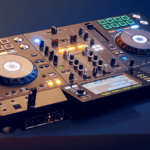
Apple laptops, and the MacBook Pro (and Macbook Air) machines especially, have consistently been a favorite in the DJ and music producer community. It’s almost a given that when you’re watching professional DJs perform or a producer working in the studio the laptop in question is going to be a MacBook, rather than a windows laptop, of some kind, usually a MacBook Pro. Sure there are exceptions now and again, but you’ve got to admit that it’s certainly an interesting development once you start paying attention.
Why Do DJs Use MacBook Pros? (in short)
The reason for the huge number of DJ Mac users is surprisingly simple. Apple computers such as MacBooks, the Macbook Air laptops, and MacBook Pros are simply made at a very high quality and the Mac OS system is so much more suited for many DJs and a DJ setup. While they aren’t the only brand out there with great laptop options, their products are almost universally held to the same standard.
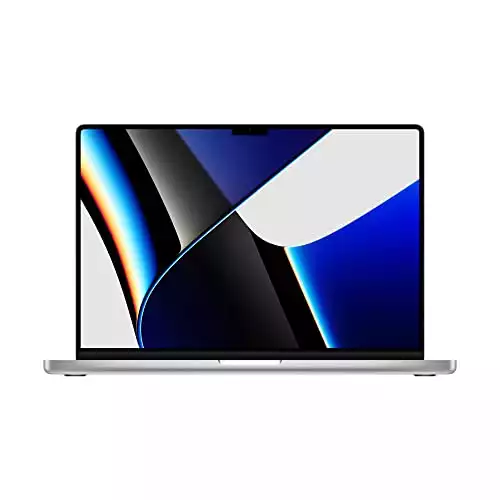
- Apple M1 Pro or M1 Max chip for a massive leap in CPU, GPU, and machine learning performance
- Up to 10-core CPU delivers up to 3.7x faster performance to fly through pro workflows quicker than ever
This means that, regardless of the year or model, a DJ can expect his MacBook Pro to have a good amount of memory, an impressive amount of hard disk space, super sturdy mac operating system. fairly low latency as well as high-performing and usable audio drivers. These are things other brands simply don’t offer to the same degree across the board. Generally, with alternatives, you can expect some good laptops on one end of the spectrum and some rough ones on the other. Apple has made it so that there is a consistent standard you can rely on.
In this guide, we’ll break down some of the different DJ tips and selling points of an Apple MacBook Pro or Macbook Air. Here, we’ll go over things like their MIDI compatibility, DJ software compatibility, the different storage space options, things like Latency or RAM, as well as simply its design and the perception surrounding Macbook laptops in today’s social landscape.
We’ll also talk about the MacBook Pro’s pricing as well as its investment prospects into your music career before finally looking at some different tips you can consider before picking one laptop up. By the end, you’ll have a clear answer on whether or not picking up a MacBook Pro is right for you.
Benefits Of Using A MacBook Pro for Djing
Storage Space
Also known as the hard disk drive (HDD for short), every laptop you get, regardless of the manufacturer or brand, has a set amount of storage space available. In most instances, your laptop will likely need an additional storage option included via an external hard drive or a USB memory stick. One of the reasons why Mac computers, especially the MacBook Pro, are such great options for DJs and music producers is that it doesn’t inherently need or require any of those things, even if you plan on loading it up with a ton of audio files and running DJ software.
In terms of HDD space, the current MacBook Pros have upwards of a terabyte of storage space. For most DJs out there, that alone would be enough of a library to hit just about any genre you wanted.
And to make this even more incredible, one terabyte is made up of over a thousand gigabytes. Suffice it to say, whether your focus is just songs, DJ and music production software, or anything else related, a MacBook Pro is going to offer more than enough space.
SSD Inclusion
Now, for those that want to use one laptop for all of their uses, be it everyday things as well as professional music production and DJing, you may be a bit dubious about the 1TB and if it’s enough. The good news is that, even if you do find yourself needing more, many MacBooks come with an SSD as standard practice. Not only are these SSD options native to the MacBook, but they have faster performance speeds, meaning you can access, download, and upload your different files more quickly and easily than with most third-party options.
SSDs are a great option for backing up important pieces of data that are essential, giving you solid peace of mind even if your laptop isn’t directly in front of you.
Memory
The MacBook Pro’s RAM is very, very impressive. This allows DJs to operate multiple programs simultaneously without any discernable impact on the performance.
This is especially great for DJs that plan on live streaming their performances since streaming online takes a considerable amount of RAM storage, especially when using Rekordbox or OBS.
If you’re planning on live streaming as a DJ, whatever computer you have needs to have 4GBs of RAM at a bare minimum.
Latency
Another huge selling point (in my opinion) for MacBooks is their low latency levels. Simply put, latency refers to the amount of time between an action being performed and its appearing on the screen or the speakers. As an example, if you press a letter key on your keyboard it should appear on the screen pretty much instantly, otherwise, you may be dealing with some higher-than-normal amounts of latency.
As a DJ or music producer, latency is a huge factor and affects how smooth your performance is. High latency is bad in general. A high latency for a DJ/ music producer is pretty much a death sentence to their career. Simply from a beat-matching standpoint, high latency can make transitioning two tracks pretty much impossible.
Thankfully these issues not only aren’t a thing with the MacBook Pro, but they pride themselves on creating a product that is overall incredibly smooth compared to most of their competition. I’ve had situations where even brand-new laptops from other companies take a bit of time with loading up or responding well. That has never been an issue even despite my having my MacBook Pro for nearly 5 years.
Audio Drivers
One of the things you may not know is an issue until it is, are audio interface drivers. I can not tell you how often I’ve had to take time out of my performance schedule to make sure my Windows laptops were using the proper audio drivers. Either you’re constantly updating windows laptops or having to manually track down the correct drivers. Now, while you could certainly argue the merits of having to track down and customize the different audio drivers for your computer, the truth is that it’s way more annoying than it is creative.
For the MacBook Pro, this isn’t the case. Here, everything is already set up and established, greatly reducing the amount of setup time you need configuring mixers, DJ controllers, and audio speakers. This means you can spend more time performing instead of mindlessly setting up audio equipment or configuring a windows laptop.
MIDI Compatibility
A huge bonus for DJs when it comes to a Mac laptop is their ease of connecting with your MIDI controller. Because the Mac OS feature comes with a ton of different MIDI devices, the MacBook Pro is very compatible with most MIDI devices.
This makes setting one up and uses much easier for DJs, especially when looking to buy newer pieces of equipment. I’d be hard-pressed to find anyone using anything OTHER than a MacBook Pro when performing a DJ set with a performance pad controller or anything compatible with Ableton.
Price
Lastly, I want to talk about the pricing. They are not cheap! Now, on one hand, it’s easy to just say that the price would be a point against Mac laptops since they’re certainly more expensive than most other standard laptops.
But that’s just the thing. MacBooks are hardly “standard”. While I’ll go over whether or not they’re worth investing in later, what certainly goes without saying is that, when comparing a MacBook Pro to most other laptops on the market, it comes out on top pretty consistently. Most non-Apple laptops only become comparable when they reach a similar price point, and at that point, it becomes a question about longevity and overall quality.
Suffice it to say, while MacBooks are undoubtedly on the pricier side of things when it comes to different laptops, it’s head and shoulders better than anything cheaper while lasting longer and remaining at a higher quality than other laptops at the same price (or even slightly more expensive).
This isn’t going to dissuade anyone from checking them out if they have a $300 laptop budget, but that also means you’re going to be limited on what processing power whatever laptop you do end up getting is going to have. Most DJs and music producers out there with MacBooks, understand that it’s the best they’re going to get at the best price out there.
- Apple M1 Pro or M1 Max chip for a massive leap in CPU, GPU, and machine learning performance
- Up to 10-core CPU delivers up to 3.7x faster performance to fly through pro workflows quicker than ever
Pros:
- Liquid Retina XDR display
- Incredible performance
- Fantastic battery life
- Awesome speakers
- USB-C ports
- 1080p webcam
Cons:
- Not a 4K display
Is The MacBook Pro Worth Investing In?
One of the bigger questions worth seriously asking is whether or not the MacBook Pro (or any MacBook laptop for that matter) is worth investing your time or money in. Sure, there are some benefits to buying one but there are also some negatives.
As stated, they aren’t going to be cheap even if you end up buying one second-hand. So, if they are going to cost you a pretty penny, what makes it worth getting instead of an equally priced Windows laptop?
As it turns out, there are quite a few. Not only do they have a higher quality build, but they last longer, are more reliable, have a sleeker and more appealing design, and simply hold a higher perceived value to the public.
Reliability & Longevity
A huge selling point for Mac laptops is their quality as a device. Not only are they incredibly reliable, but that reliability directly correlates to a much longer lifespan. Not only that, but the reason for the change was solely for the sake of larger storage space.
In terms of performance, while the newer one was certainly faster, that didn’t mean that the 2012 model was by any means slow or difficult to use, even when running newer and denser DJ software programs.
Overall, the MacBook Pro is something that works well and works well for a surprisingly long time. Whether we’re talking about the build, its ability to keep from overheating, or the fact that it can run the most up-to-date DJ software programs even when over 10 years old, it’s a laptop that’s worth more of your time and money compared to many of its contemporaries.
And a quick word of advice: DO NOT use cracked DJ software. That is a recipe for disaster. Always aim to run the latest DJ software such as rekordbox and Serato. Your Mac operating system will then you.
Cool Design
Design appeal is largely subjective and can vary from person to person. However, while this is true, it’s also true that many people appreciate the slim, sleek design that they’ve made for themselves.
The look is iconic and classical while also being easily customizable to your tastes. And while we’ll jump into the public often perceives the laptop itself, it’s worth noting here that the Apple logo is something that is immediately recognized as valuable compared to the majority of other laptop options out there.
Street Cred
This may not seem like a legitimate point at first glance but the truth of the matter is that Apple products have generally been considered to be a top-tier product when compared to their competitors. Even when compared to products that are considered objectively better in many regards, Apple product often wins a few points over just by the nature of public perception. This is true for all of their products, and it is true for the MacBook Pro.
There’s a reason most DJs, music producers, and performers, in general, tend to have a Mac. And, while a big part certainly has to do with the many features we’ve already touched on, it’s also true that, for just as many, they got it solely because it was a MacBook.
Essentially, even if you never took advantage of any of the actual benefits of using a MacBook, just by having it your audience will perceive you as being more accomplished and legitimate. You’re certainly going to be able to perform, sure, but if people see you performing with a MacBook Pro instead of a Lenovo, you’ve already given yourself some serious street cred.
On top of the perceived value when performing, because the MacBook Pro is so highly regarded by the public, it makes the resell value much higher than it may otherwise have been. Simply put, reselling a MacBook is going to be much easier and much more profitable than reselling most other laptops even if they’re just as old or have been out just as long.
This is also great if you’re planning on upgrading to a better laptop down the line since much of what you initially paid you’ll be able to get back when selling it out again, reducing how much upfront money you’d need later on.
- Apple M1 Pro or M1 Max chip for a massive leap in CPU, GPU, and machine learning performance
- Up to 10-core CPU delivers up to 2x faster performance to fly through pro workflows quicker than ever
Buying A Used MacBook Pro (checklist)
Now that we’ve determined what makes a MacBook Pro worth your time, here are some useful tips you should consider as a DJ when purchasing any laptop, be it MacBook or otherwise.
- Check Ports: Regardless of the type of laptop you end up getting, you’re going to want to make sure you have enough plugin ports as possible. For example, you’re likely going to need at least one to connect with your DJ controller. Other devices (mics, speakers, cameras, etc.) should all also be considered. If a laptop doesn’t have as many ports as you need, you may need to invest in an adapter or consider another option.
- Certified Used: A brand new MacBook Pro is certainly a nice option if you’ve got the money and want things at the top of the line, however, for many it may not be financially feasible. A great alternative is to check out MacBook options that are one, two, or even three years old. Remember that these laptops have an impressive level of longevity. Opting for an older model will likely only shave some extra dollars off the price while retaining virtually all of the benefits that come with a MacBook Pro computer.
- Carry A USB Flash: There are a lot of benefits that come with having a large storage space, however just because your laptop has a large amount of storage doesn’t mean external storage should automatically be dismissed. Whether it’s holding onto a pair of USB drives, signing up for a cloud service like Dropbox, or holding onto a full-on external hard drive you want to make sure you’ve got some sort of backup for your different files.
- Discounts: Following up with the certified used option, you also want to make sure you’re getting your laptop at the absolute best price. This means checking for different sales or discounts such as Black Friday or Cyber Monday. If you’re a student you can also see about getting a MacBook Pro at a discounted price.
- Check Format Types: You also want to make sure the USB format type for your ports is the same for the specific devices you have. As an example, many of the newer MacBooks only have USB Type-C ports, which can make Type-A and Type-B options difficult. Again, you may need to invest in a hub or adapter to accommodate what you’re missing.
- Limit Tabs: If you’re a performer, one of the things you want to make sure you categorically don’t do is have a ton of things open on your computer while performing. Even if you’re using a MacBook Pro, having a bunch of unnecessary web pages and DJ software files open is actively slowing your computer down and making the chances of a glitch or freeze occurring increase substantially. Keep what you need and what you need only.
Why Do DJs Use MacBook Pros? Summary
So that is why DJs Use MacBook Pros! Ultimately, if you were to ask me whether a Mac computer is worth your time as a DJ or music producer, I’d have to say yes. Even if you’re just starting and you have very little experience performing, MacBooks are easy to use, impressively built, come with a ton of storage and memory, and software crashes are very rare.
Put simply, there is a reason DJs and music producers at the highest level opt for MacBooks to run their DJ software over most other laptops even at the same all-around price.
While there may be certain laptops out there that beat the MacBook out in one method or the other, the reality is that Apple has made a product that excels in everything it does with very little to complain about, something very few other laptops can confidently replicate.